Microsoft Fabric vs Traditional BI Stack: Which One Is Right for Your Business?
Microsoft Fabric vs Traditional BI Stack: What’s the Real Difference?
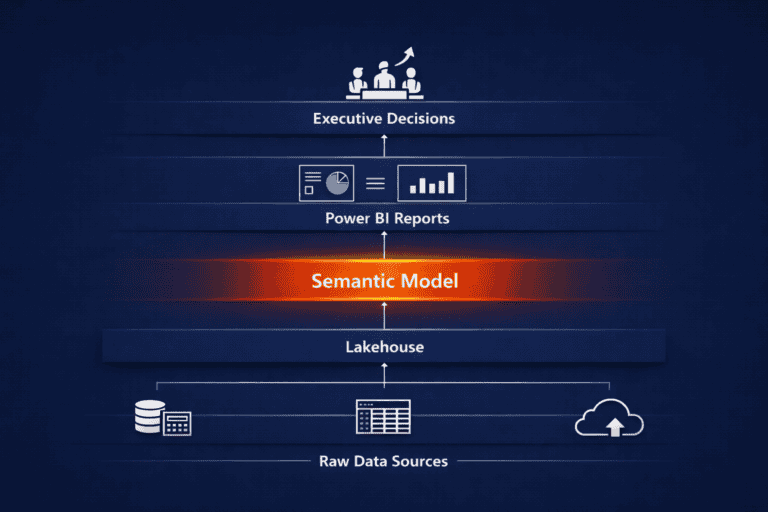
The real difference between Microsoft Fabric and a traditional BI stack is structural. A traditional stack stores the same data multiple times across separate tools for warehousing, transformation and reporting, while Fabric holds one copy in a shared layer called OneLake and lets every workload read from it directly.
That distinction sounds technical, but it shows up in a very business-level way. A CFO asks why the finance dashboard and the operations dashboard disagree on the same revenue figure, and the honest answer is usually that they were never built from the same copy of the data in the first place.
The platform comparison itself is the easy part, and Microsoft publishes plenty of documentation on it. The harder question, and the one we get asked in almost every scoping conversation, is which architecture actually suits the business asking. This post sets out what a traditional BI stack means, where it tends to break down, what OneLake changes structurally, and the diagnostic we run with clients to work out which side of that line they’re on, including when the honest answer is to stay exactly where they are.
If you want the fuller business case for Fabric or a guide to integrating it with Power BI, we cover those separately: why businesses implement Microsoft Fabric and the benefits of integrating Power BI with Microsoft Fabric.
What Does a “Traditional BI Stack” Actually Mean?
A traditional BI stack is a set of separate, purpose-built tools chained together to move data from source systems into a report: a data warehouse for storage, an ETL or ELT tool to move and reshape data, and a reporting tool like Power BI sitting on top.
In practice, that usually looks like some version of the following, accumulated one decision at a time rather than designed as a system:
- A data warehouse or set of warehouses, often one per major system or department, holding structured, historical data ready for reporting
- An ETL/ELT layer, whether a dedicated tool, scheduled scripts, or a data engineer’s notebook, that extracts data from source systems, transforms it and loads it into the warehouse
- A reporting layer, typically Power BI, connecting to the warehouse through imported datasets or DirectQuery, with a semantic model (or several inconsistent ones) built on top
- Point-to-point integrations between systems that need to talk to each other, each one built and maintained independently
Individually, every one of these tools does its job well. The issue is that each was selected and built to solve one team’s immediate problem, rather than designed to work together as a single, governed system. Our guide on what a single source of truth in Power BI and Microsoft Fabric actually looks like covers that in more depth. A single source of truth is also the standard most businesses have already stopped meeting by the point they start asking whether Fabric is worth it.
Where Does a Traditional BI Stack Break at Scale?
A traditional BI stack tends to break at scale in four predictable places: data duplication, integration overhead, governance retrofitting, and licensing sprawl, and all four compound as more teams and reports get added.
- Data duplication. Every warehouse, every extract and every Power BI import is a separate copy of the same underlying facts, refreshed on its own schedule. The moment two copies fall out of sync, even briefly, two departments start reporting different numbers from what they both believe is “the data.”
- Integration overhead. Connecting five systems the traditional way means building and maintaining roughly ten point-to-point connections, each with its own failure modes, its own monitoring, and its own person who understands how it works. That overhead grows faster than the business does.
- Governance retrofitting. Access control, data lineage and row-level security get bolted onto each tool separately, if they get built at all. Retrofitting governance once dozens of reports already depend on a looser model is materially more expensive than designing it in from the start, and it is where most growing businesses first feel real pain.
- Licensing sprawl. A separate warehouse contract, a separate ETL tool subscription, and separate Power BI capacity add up to several vendor relationships, each billed and renewed independently, with no shared view of total cost.
None of this means the traditional stack was a poor choice at the time. Most organisations arrive here exactly the way our BI failure framework describes: by solving real, immediate problems one tool at a time, until the accumulated tools start working against each other. Recognising the pattern is the first step to fixing it, and it’s usually the point at which a business first asks us about Fabric.
What Is OneLake, and Why Does It Matter Commercially?
OneLake is the single, organisation-wide data layer built into every Microsoft Fabric tenant, and it is the structural reason Fabric can remove the duplication problem described above: every Fabric workload, from data engineering to Power BI reporting, reads and writes through the same copy of the data instead of each tool keeping its own.
Commercially, two things about it matter more than the technical detail. First, it means governance, once designed properly, applies across every workload rather than being rebuilt tool by tool. Second, OneLake stores your data itself in an open format, rather than a proprietary one. That’s a genuine answer to a fair question we hear often: “what happens if we ever need to move off this platform?” Because those files can be read by other compatible tools directly, without an export step first, your underlying data isn’t held hostage the way it would be in a closed format. We go deeper on the mechanics in our Power BI and Fabric integration guide, and on what this open format does and doesn’t actually cover in the FAQ below; this post is more concerned with whether that mechanism is actually worth adopting for your business yet.
How Do We Decide Whether a Business Should Move?
We decide whether a business should move to Fabric by running a short diagnostic before any architecture gets discussed, because the platform comparison rarely settles the question on its own; three signals do most of the work.
- How many places is the same number defined right now? If finance, operations and sales can each produce a different figure for “revenue” from three different sources, that’s a duplication problem Fabric is built to solve. If one team owns one warehouse feeding one consistent set of reports, the problem doesn’t exist yet, and consolidating a system that isn’t fragmented adds cost without a corresponding gain.
- Who would own this once it’s live? A unified platform still needs someone accountable for it day to day, in the same way someone previously owned the ETL schedule or the warehouse budget. If there’s no clear owner for that, a familiar, well-understood stack is often the more reliable choice, even if it’s less architecturally elegant.
- What’s driving the conversation? A genuine scale, governance or AI-readiness need is a strong reason to move. General enthusiasm for a newer platform, on its own, isn’t, and we say so when we see it.
This is also where the SeedGrowth Data Maturity Curve earns its place in the conversation. A business still in Stage 1, Reactive Reporting, with inconsistent, largely manual reporting, rarely has the workload volume or duplication problem that justifies this move yet; the higher priority is getting basic BI adoption and trust in place first. It’s Stage 2 businesses, Organised BI, with tools in place but no shared architecture underneath them, who feel this decision most acutely, because they have exactly the symptoms described above.
Discovery comes before architecture in every Fabric conversation we run. The cost and licensing detail, capacity SKUs, per-second billing, reserved-capacity discounts, is all published and current on Microsoft’s own pricing pages, and we’d rather point you there than reproduce a number that changes by region and agreement. What that pricing page can’t tell you is which SKU your business actually needs, or whether you need one at all yet. That’s the assessment we run before recommending a migration, and it’s the same discovery-first approach behind the four-phase implementation roadmap we set out in why businesses implement Microsoft Fabric. It’s also the same diagnostic that underpins our Data Strategy & Architecture work.
When Should a Business Not Switch to Microsoft Fabric?
A business should hold off on switching to Microsoft Fabric when its current reporting is small enough, stable enough, and low-duplication enough that a consolidated platform would add operational overhead without removing a real problem. Specifically, we tend to advise staying on a traditional stack when:
- A single, well-governed reporting environment already exists. One team, one warehouse, one consistent set of Power BI reports, no competing versions of the same numbers. There’s no duplication problem here for Fabric to solve.
- Reporting volume and refresh needs are modest. A business running a handful of scheduled, non-time-sensitive reports is unlikely to hit the performance or scale limits that make a unified platform worth the move. Near real-time refreshes, hourly or daily, are often perfectly sufficient, a point we cover in more depth in why businesses implement Microsoft Fabric.
- There’s no one to own it day to day. A unified platform only pays off if someone is actively managing it. A team without that capacity will likely find a fixed, familiar setup easier to run reliably.
- The definitions problem hasn’t been solved yet. Migrating fragmented, inconsistently defined data onto a unified platform doesn’t fix the inconsistency; it just makes it faster to distribute. If your leadership team hasn’t yet agreed what “revenue” or “active customer” actually means across departments, that discovery work needs to happen first, ahead of any platform migration. We incorporate this this into our implementation process and help you define those terms.
- AI-readiness isn’t a near-term priority. A governed foundation for AI is a genuine benefit, but a distant one where AI isn’t on the roadmap for the next year or two, and a distant benefit rarely justifies migrating today.
None of these are permanent conditions. A business can sit comfortably on a traditional stack for years and then cross one of these thresholds quickly, typically when a second entity, a new reporting requirement, or a first serious AI use case appears. Part of what we do is help clients recognise that shift when it happens, rather than move early on principle or wait too long out of habit.
Quick Wins: Assessing Your Own Stack
Before deciding either way, three checks give a reasonably clear read on where your business sits:
- Count your copies. For your three most-used metrics, trace how many separate places that number is calculated or stored. More than one is a duplication signal, regardless of which platform you’re on.
- Time a governance change. Estimate how long it would take to add or remove one person’s access to a specific report today. If the honest answer involves several tools and several people, governance has already been retrofitted rather than designed in.
- Ask who owns the definitions. Identify who in the business has the authority to say what “revenue” officially means, if anyone. If no one does, that’s the higher-priority fix, ahead of any platform decision.
Pro tip: Do this assessment before evaluating platforms. It tells you whether the problem is architectural (a case for Fabric) or definitional (a case for the discovery work described in why businesses implement Microsoft Fabric), and those two problems call for different first steps.
Frequently Asked Questions
Microsoft Fabric vs traditional BI stack: which is right for my business?
It depends on how much duplication and governance overhead your current stack has actually accumulated. A business with one well-governed warehouse and modest reporting needs is well served by a traditional stack; a business juggling several disconnected tools, inconsistent definitions, and rising integration cost is a strong candidate for Fabric’s unified architecture. We run a short diagnostic with clients to make this call rather than defaulting to either answer.
Does moving to Microsoft Fabric mean replacing Power BI?
No. Power BI continues as the reporting layer; Fabric adds data engineering, integration, data science and real-time intelligence around it, all built on OneLake. Existing Power BI reports can be repointed to OneLake incrementally rather than rebuilt from scratch
What is OneLake, in one sentence?
OneLake is the single, organisation-wide data layer built into every Fabric tenant, storing data once in an open format so every Fabric workload can read and write it directly instead of each tool keeping its own copy.
Does OneLake’s open format mean we’re not locked into Fabric?
Not entirely, and it’s worth being precise about which part of that concern it actually addresses. OneLake’s open format means your raw data is portable: other compatible tools can read those files directly, without an export step, so you’re not held hostage the way you would be by a closed, proprietary format. That’s a genuine answer to the data side of the lock-in question. It doesn’t extend to everything built on top of that data, though: your semantic models (measures, relationships, row-level security), governance rules, pipeline orchestration and Power BI reports are all defined inside Fabric’s own systems, and moving away means rebuilding each of those in whatever replaces it. The open format addresses data lock-in. Re platform lock-in, the effort of rebuilding everything you’ve built on Fabric, is a separate question, and it’s still real.
Is Microsoft Fabric more expensive than a traditional BI stack?
It depends on your current setup, and this is exactly why we treat cost as a scoping question rather than a headline number. Fabric’s capacity pricing is published on Microsoft’s pricing pages and varies by SKU, region and commitment term. What that page can’t tell you is which SKU your workload needs or whether consolidating your existing tools would offset it, which is the scoping work we do before quoting a project.
How do I know if my BI stack has outgrown its architecture?
The clearest signs are two departments reporting different numbers for the same metric, governance rules that differ tool by tool, and integration costs that keep climbing as more systems get connected. Our Quick Wins assessment above gives a fast way to check.
Recap: Key Takeaways
Microsoft Fabric vs Traditional BI Stack at a Glance
- A traditional BI stack chains together separate tools for storage, transformation and reporting, each holding its own copy of the data.
- That architecture tends to break at scale through data duplication, integration overhead, governance retrofitting and licensing sprawl.
- OneLake removes the duplication at the source by giving every Fabric workload one shared copy of the data in an open format.
- The right choice comes down to how much duplication and governance pain is real today, who would own the platform once it’s live, and what’s genuinely driving the conversation.
- Staying on a traditional stack is a legitimate outcome of that diagnostic for a business that’s small, stable and well governed already.
From Data Chaos to Decision Clarity
Choosing between Microsoft Fabric and a traditional BI stack comes down to which architecture matches the decision-making problem your business actually has today. Get the diagnosis right, and either choice can support genuine decision clarity. Get it wrong, and even the more sophisticated platform just moves the same reconciliation arguments into a more expensive system.
If you’re not sure which side of that line your business sits on, take a data maturity assessment to see where you fall on the Data Maturity Curve, or book a call with SeedGrowth Analytics to talk through what your current stack is costing you in duplicated effort.
For more insights, follow SeedGrowth Analytics on LinkedIn.
Rachel O’Connor is Co-Founder and runs Operations at SeedGrowth Analytics. She focuses on building people, process and purpose into the heart of the business so that data delivery is consistent, scalable and trusted across clients. Her interest is in how data gets used, how people make decisions, and what it takes to turn insight into action in real business environments. Connect on LinkedIn